Vocal rider · VST3 + AU
Rider
It turns the quiet words up and the loud words down while you record, so the vocal sits at one level. FL Studio, Logic, Ableton, Reaper.
Version 0.2 · Windows 10/11 64-bit · macOS 11 or newer
Windows
Install in a minute
- Open Rider-0.2-windows-setup.exe.
- Windows will say it protected your PC. That's because Rider is new and unsigned. Click More info, then Run anyway.
- Click Install.
- In FL Studio: Options › Manage plugins › Find installed plugins. Rider shows up under Ruthless Ideas.
Mac
Install in a minute
- Open Rider-0.2-mac.pkg. The Mac will say it can't check it. That's because Rider is new and unsigned. Click Done.
- Open System Settings › Privacy & Security, scroll down, click Open Anyway next to Rider.
- Click through the installer.
- In Logic: Settings › Plug-in Manager › Reset & Rescan. Rider is under Audio Units › Ruthless Ideas.
Updating
Close your DAW, download again from this page and run the installer. It replaces the old version, and your songs keep their settings. The version is shown at the top of Rider’s window.
Using it
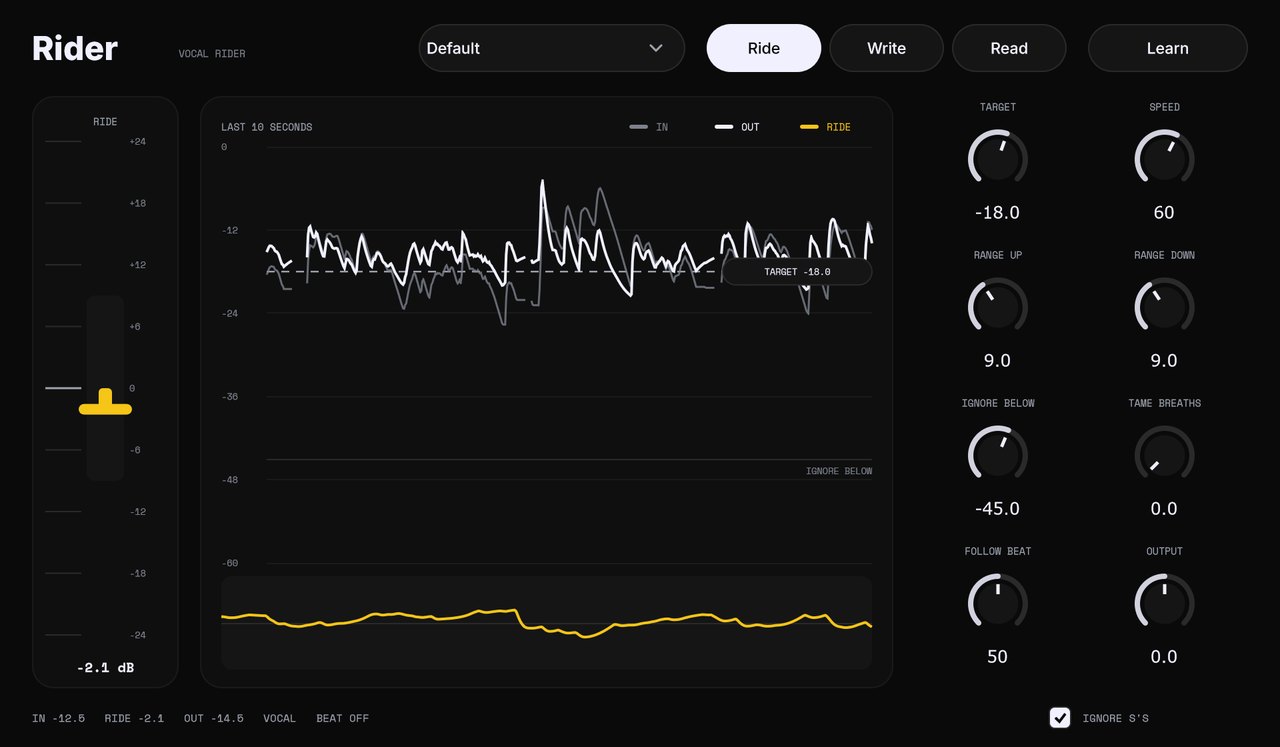
Every control has a ? next to it. Click a knob’s number to type a value, double-click to reset, drag the corner to make the window bigger.
- Where
- On the vocal track, first in the chain, before compression.
- Learn
- Hit it and sing 6 seconds. It sets the target to your own level.
- Range
- The most it will ever push up or pull down.
- Speed
- Low for smooth singing, high for rap.
- Ignore below
- Room noise and bleed under this level are left alone.
- Breaths
- Pulls the gaps between words down, so breaths and room noise sit lower. Start around -3 dB.
- De-ess
- Stops S, T and SH sounds from fooling Rider into turning a word down.
- Follow beat
- Send the beat to Rider's sidechain. When the beat gets louder (a chorus, a drop), the vocal comes up with it, up to 6 dB. The bottom bar shows the lift live.
- Write / Read
- Write records the ride as automation. Read plays it back so you can fix any move by hand.